I may earn a commission at no extra cost to you. #ad
Free Interactive Gender Reveal Ideas: A Comprehensive Guide for 2024
Jump to Section
Welcome to the era of shared experiences. In 2024, gender reveals have shifted away from simple "look-at-me" moments toward immersive, community-driven events. Parents-to-be are increasingly looking for ways to make their guests feel like a part of the journey, rather than just spectators. Best of all, making your reveal interactive doesn't have to cost a dime.
Why Interactive Reveals Matter in 2024
In a world saturated with social media clips of confetti cannons and smoke bombs, the "shock value" of a reveal has started to wane. What remains impactful is the connection between the family and their support system. Interactive reveals build anticipation, foster conversation among guests who may not know each other, and create lasting memories that go beyond a five-second video clip.
By using free, interactive elements, you shift the focus from the "stuff" to the "people." Whether it's through friendly competition or collective guessing games, your guests will leave feeling more connected to your growing family.
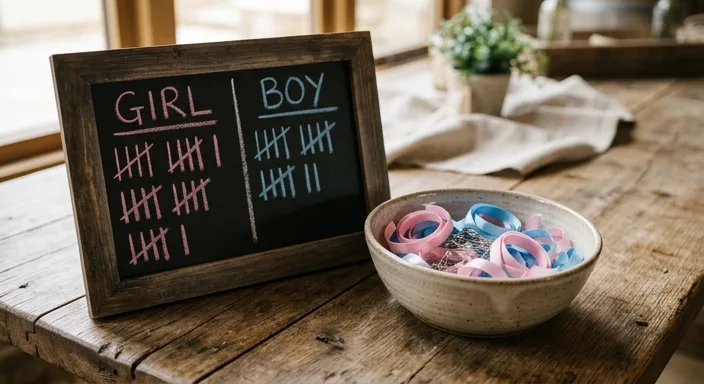
The Ultimate Free Voting Station
One of the easiest and most effective free interactive ideas is the DIY Voting Station. You don't need a professional printed board; a simple mirror, a window, or a piece of cardboard will do perfectly.
Use what you have at home:
- The Window Method: Use dry-erase markers (or even soap) to draw a "He or She" chart on a sliding glass door. Guests sign their names on the side of their choice.
- The Ribbon Box: If you have leftover ribbons from gifts, cut them into small strips. Guests pin a blue or pink ribbon to their shirt upon arrival.
- The Jar Guess: Use two mason jars and small pieces of scrap paper. Ask guests to write one piece of advice for the baby on the paper and drop it in the "Boy" or "Girl" jar.
Old Wives’ Tales Interactive Quiz
This is a classic for a reason. It’s free, hilarious, and gets everyone talking. Create a simple list of "Old Wives' Tales" and have your guests vote on what they think the result is for you.
Common questions include:
- Is the mom-to-be craving sweet (girl) or salty (boy)?
- Is the baby's heart rate fast (girl) or slow (boy)?
- Is the carrying position high (girl) or low (boy)?
- The Ring Test: Does it swing in a circle (girl) or a line (boy)?
You can read these out loud like a game show host, asking for a show of hands for each one before revealing your actual symptoms. It’s a great way to fill time while waiting for the main reveal event.
The "Wear Your Guess" Dress Code
Interaction starts before the party even begins. In your invitation (which can be a free digital invite via text or email), ask guests to wear something that represents their guess. They don't need to buy new clothes; a blue tie, a pink scarf, or even a specific colored hair tie works perfectly.
When guests arrive, they immediately have a "team" and a conversation starter with others. You can even take a group photo of "Team Pink" vs. "Team Blue" to see who was right after the big announcement.
DIY Collaborative Scavenger Hunt
Instead of you doing the revealing, let your guests find the answer. Create a simple scavenger hunt around your home or backyard. Hide 5–7 clues written on scrap paper. Each clue leads to the next, and the final clue leads to the "reveal item" (like a hidden pair of baby shoes or a sonogram photo).
To make it interactive, split your guests into two teams. They have to work together to solve the riddles. This builds immense tension and excitement as they race to find the final answer.
Free Digital & Remote Interaction Ideas
If you have family members who can't make it in person, you can still include them without spending a dime. Use a free Zoom or Google Meet link to broadcast the reveal. Before the reveal, use the "Poll" feature in the meeting software to let them cast their votes digitally.
Another great idea is a Digital Prediction Wall. Use a free tool like Padlet or even a shared Google Doc where guests can upload a "prediction selfie" with their guess. It creates a digital guestbook that you can keep forever.
Tips for a Seamless Free Reveal
Planning a free interactive reveal requires a little more coordination but much less money. Here are some pro tips to ensure it goes smoothly:
- Designate a "Secret Keeper": If you want to be surprised too, have a trusted friend receive the results from your doctor. They can handle the "behind the scenes" setup of the final reveal item.
- Keep it Short: While games are fun, don't drag them out too long. 30 to 45 minutes of interaction before the big reveal is usually the "sweet spot."
- Use Your Space: If you have a backyard, use the space to spread people out. If you're in an apartment, focus on vertical space for your voting boards and signs.
- Lighting Matters: Since you'll likely be taking photos on your phone, ensure your reveal area is well-lit, preferably with natural light.
Frequently Asked Questions
Do I need to provide prizes for the games?
Not at all! The "prize" is usually the glory of being right. If you want to offer something, "bragging rights" or a special photo with the parents-to-be is more than enough.
What if the doctor's results are wrong?
While rare, it does happen. The beauty of a free, interactive reveal is that it's about the celebration of the baby, not the perfection of the event. If the results change later, it just becomes a funny story for the baby's first birthday!
Can I do an interactive reveal with just my partner?
Absolutely. You can set up a "date night" scavenger hunt for each other or open a sealed envelope together at your favorite park. Interaction doesn't require a crowd.